Minecraft Circle Generator | Easily build perfect circles & ellipses
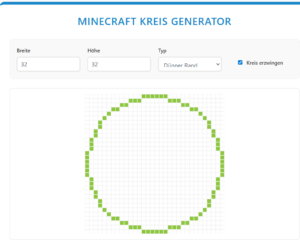
Minecraft Kreis Rechner: Perfekte Kreise Block für Block planen
Mit dem Minecraft Kreis Rechner planst du runde Bauwerke ganz ohne Kopfrechnen: Gib den gewünschten Durchmesser oder Radius ein, und der Rechner zeigt dir sofort die exakte Kreisvorlage sowie die benötigte Blockanzahl. So baust du Türme, Kuppeln, Arenen oder Brunnen sauber und symmetrisch – Block für Block nach Vorlage, ganz ohne schiefe Kanten. Der Rechner eignet sich für kleine Deko-Kreise (5–9 Blöcke) genauso wie für große Bauwerke mit 100 oder 200 Blöcken Durchmesser. Tipp: Baue zuerst nur den Rand und fülle den Kreis danach aus. Den ausführlichen deutschen Generator mit allen Formen (Kugel, Ellipse, Halbkreis) findest du auf unserer Seite Minecraft Kreis Generator.
Minecraft is a game full of creativity, but when it comes to round shapes , many players run into a problem.
Square blocks make it difficult to build perfect circles or ellipses. This is exactly where a Minecraft circle generator comes in.
In this article you will learn:
- why circles are difficult in Minecraft
- how a Minecraft circle generator works
- How to build perfect circles step by step
- typical mistakes and professional tips
👉 In the end, you’ll know exactly how to create clean, symmetrical circles in Minecraft – without frustration.
Why are circles so difficult to draw in Minecraft?
Minecraft is based on a square block grid .
While lines and squares are simple, circles quickly become problematic:
- oval shapes
- asymmetrical edges
- incorrect radii
Many players try to do it „by feel“, but the result often looks uneven.
👉 That’s exactly why experienced builders use a Minecraft circle generator .
What is a Minecraft circle generator?
A Minecraft circle generator is an online tool that calculates the exact circle size based on a radius or diameter :
- which blocks you need to place
- what the circle looks like from above
- whether it is a circle or an ellipse
Here’s how you can:
- to save time
- Avoid mistakes
- professional construction
💡 Whether for towers, domes, arenas or decorations, the generator provides you with a perfect template.
How does a Minecraft circle generator work?
The way it works is simple and logical:
- You choose the radius or diameter.
- The tool calculates the block positions.
- You will receive a visual template.
- You recreate these blocks by blocks in Minecraft.
👉 You can calculate a circle directly here:
Use the Minecraft Circle Generator
Step-by-step: How to build a circle in Minecraft (tutorial)
Set size
Think first:
- How big should your circle be?
- Is it part of a building or just decoration?
Tip:
- Small circles (5-9 blocks) = decoration
- Large circles (15+ blocks) = towers, arenas
Use Circle Generator
Enter the desired radius in the Minecraft circle generator
. You will immediately see:
- a symmetrical block arrangement
- perfect curves
Recreate it in Minecraft
- Start in the middle
- Build block by block according to the template
- Use the same materials for a clean look.
💡 Pro tip:
First build only the outline , then fill in the circle.
Circle or ellipse – what’s the difference?
form | Description | mission |
Circle | Same radius in all directions | Towers, fountains |
ellipse | Two different radii | Domes, roofs |
Many Minecraft circle generators also allow ellipses, ideal for creative building projects.
Common mistakes when building a circle (and how to avoid them)
Built by feel
- Result: uneven shapes
- Solution: Always use the generator
❌ Choose the wrong middle ground
➡️ Circle appears shifted
✅ Solution: Mark the center point
❌ Circles too small
➡️ They look angular
✅ Solution: Choose a larger radius
For which projects is a Minecraft circle generator suitable?
A Minecraft circle generator is ideal for:
- Towers & Castles
- Arenas & Stadiums
- Domes & Roofs
- Spring
- Pixel Art & Designs
This tool is indispensable, especially for large construction projects.
Why our Minecraft circle generator is the best choice
Our tool is:
- for free
- usable immediately
- Suitable for beginners and professionals
- mobile & desktop friendly
No download, no registration, simply enter the radius and start building.
👉 Try it now: Minecraft Circle Generator
Frequently Asked Questions
Is it possible to build perfect circles in Minecraft?
Yes, perfect circles are easily achievable with a Minecraft circle generator .
Which is better: a circle or an ellipse?
It depends on the project.
For symmetry → circle.
For dynamics → ellipse.
Is the circle generator also available for large builds?
Yes, the generator also works for very large radii .
Conclusion: Perfect circles without frustration
Circles are among the most difficult shapes in Minecraft
, but with a Minecraft circle generator it becomes easy, fast and precise.
Whether beginner or professional:
Use a template
- Save time
- Build cleanly and symmetrically
Start now and create your perfect Minecraft circle!